 Codynex School
School management software
Run your whole schoolfrom one app
 Teacher app
 Parent app
Codynex School puts attendance, fees, exams, homework and parent messages in one place, under your school's own name. Parents can use it in Tamil.
01For the office
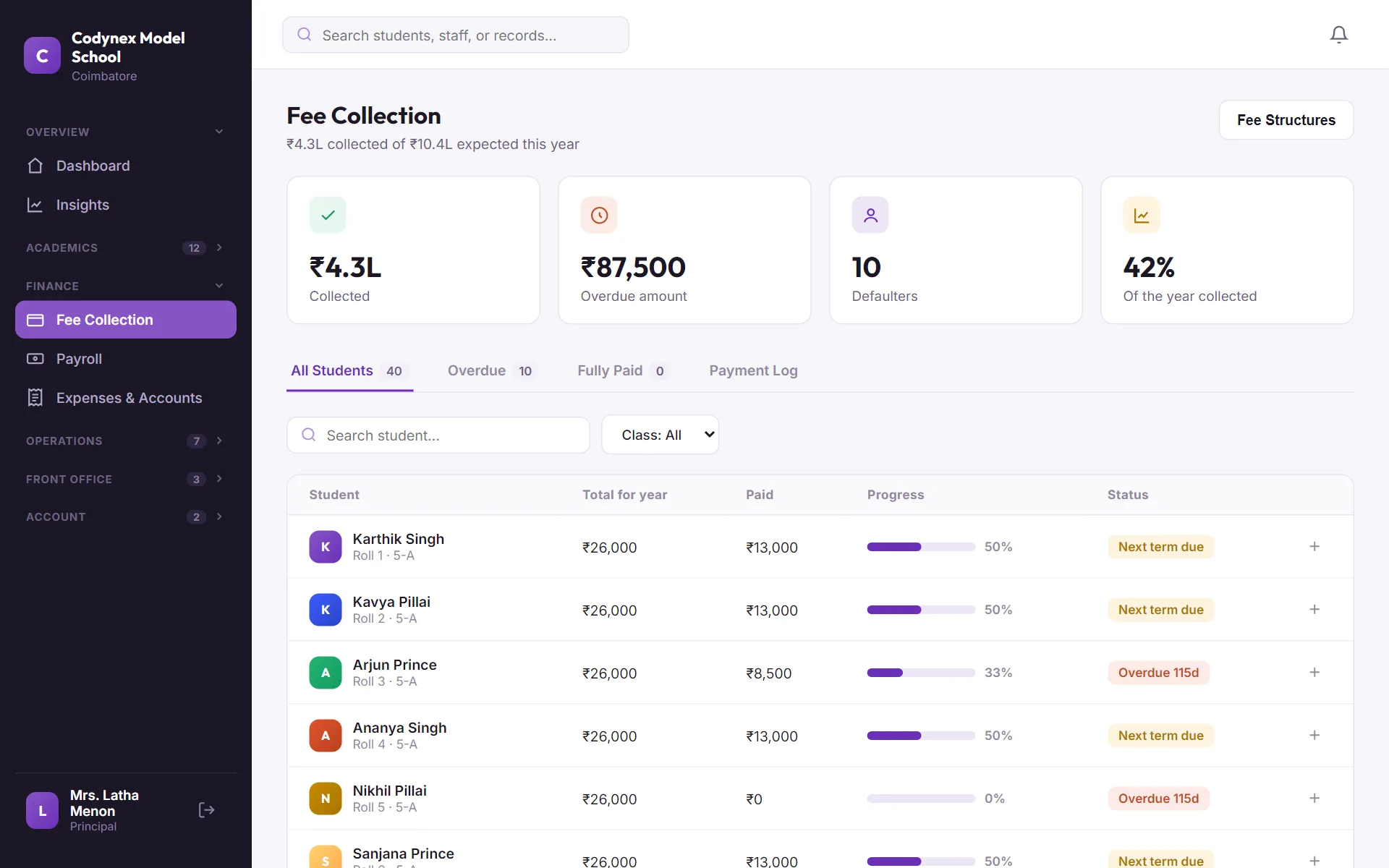
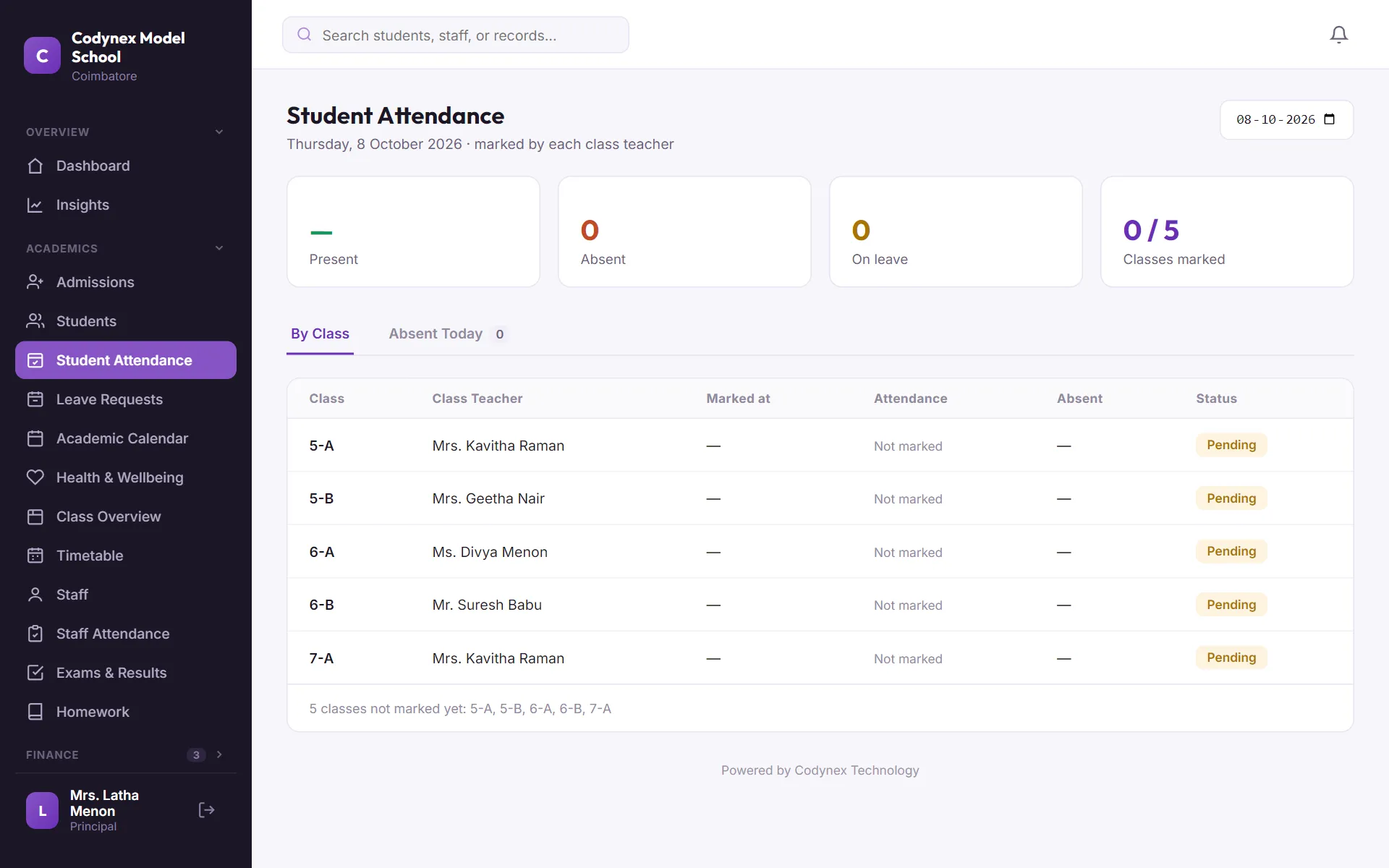
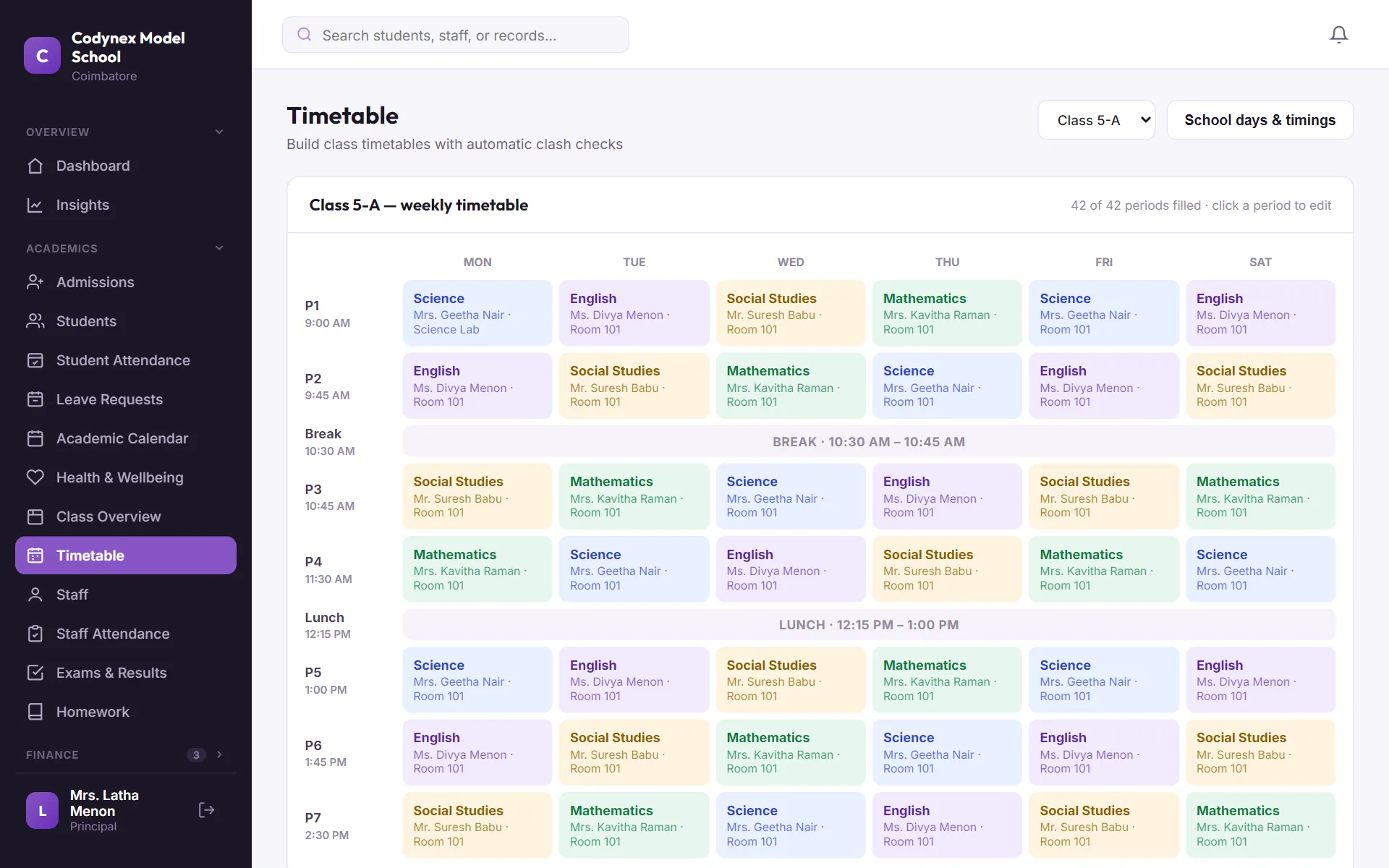
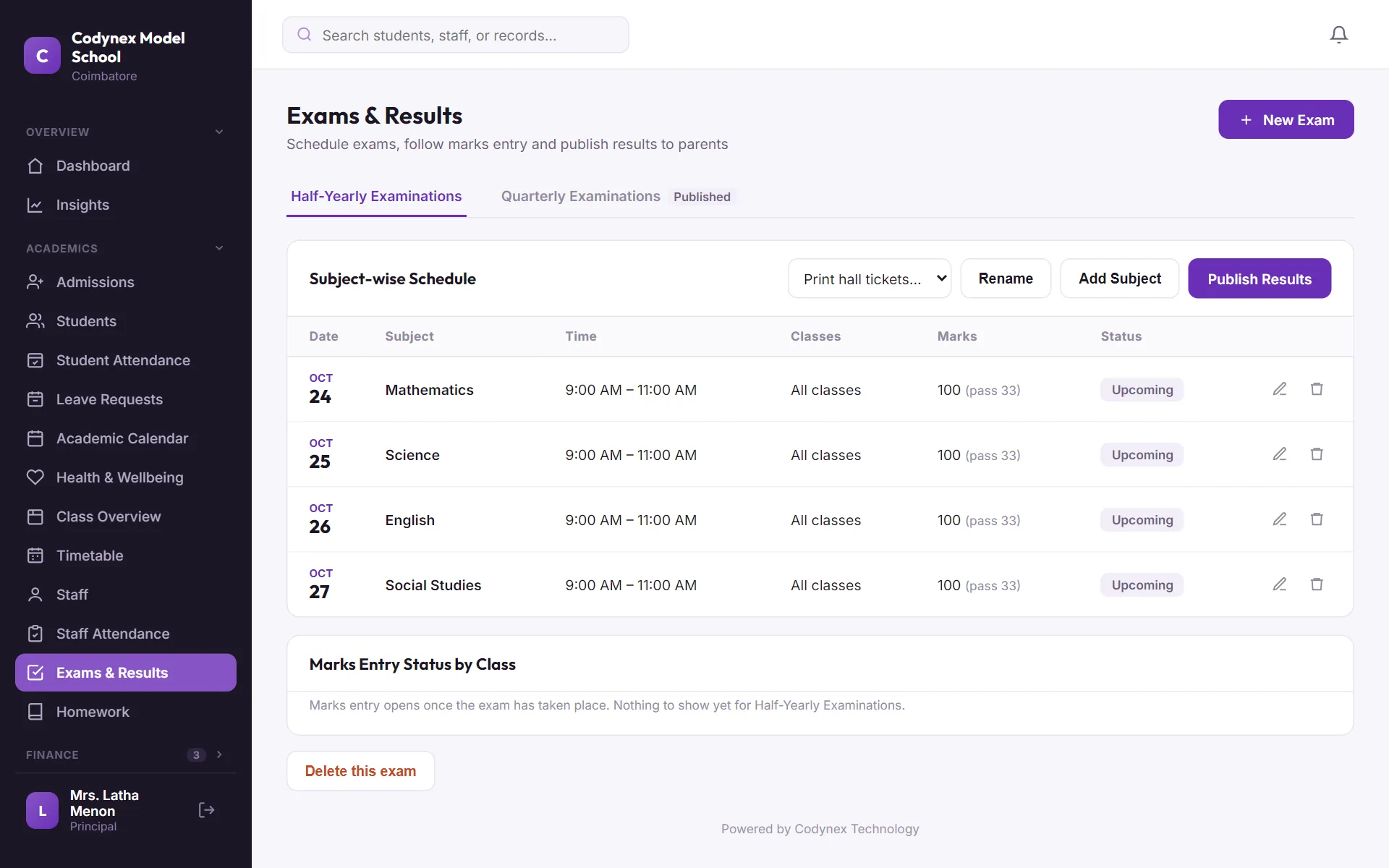
Fees, attendance, timetable, exams and payroll. In one panel.
-
See what has been collected, what is overdue and who owes it, the moment you open the page. The overdue list builds itself.
ReplacesNotebooks, spreadsheets and phone calls
-
Pick the student, enter the amount, save. The receipt is numbered for you, and the parent sees the payment in their app.
ReplacesA handwritten receipt book
-
Every class on one page as teachers mark it from their phones. No more finding out at noon who did not come.
ReplacesA register only one teacher can open
-
Build each class's week on a grid. A teacher cannot be put in two rooms at once, and half days are built in.
ReplacesA chart on the staff-room wall
-
Schedule the exam, print hall tickets, and let each teacher enter marks for their own subject. Grades and report cards follow.
ReplacesThe same marks written three times
-
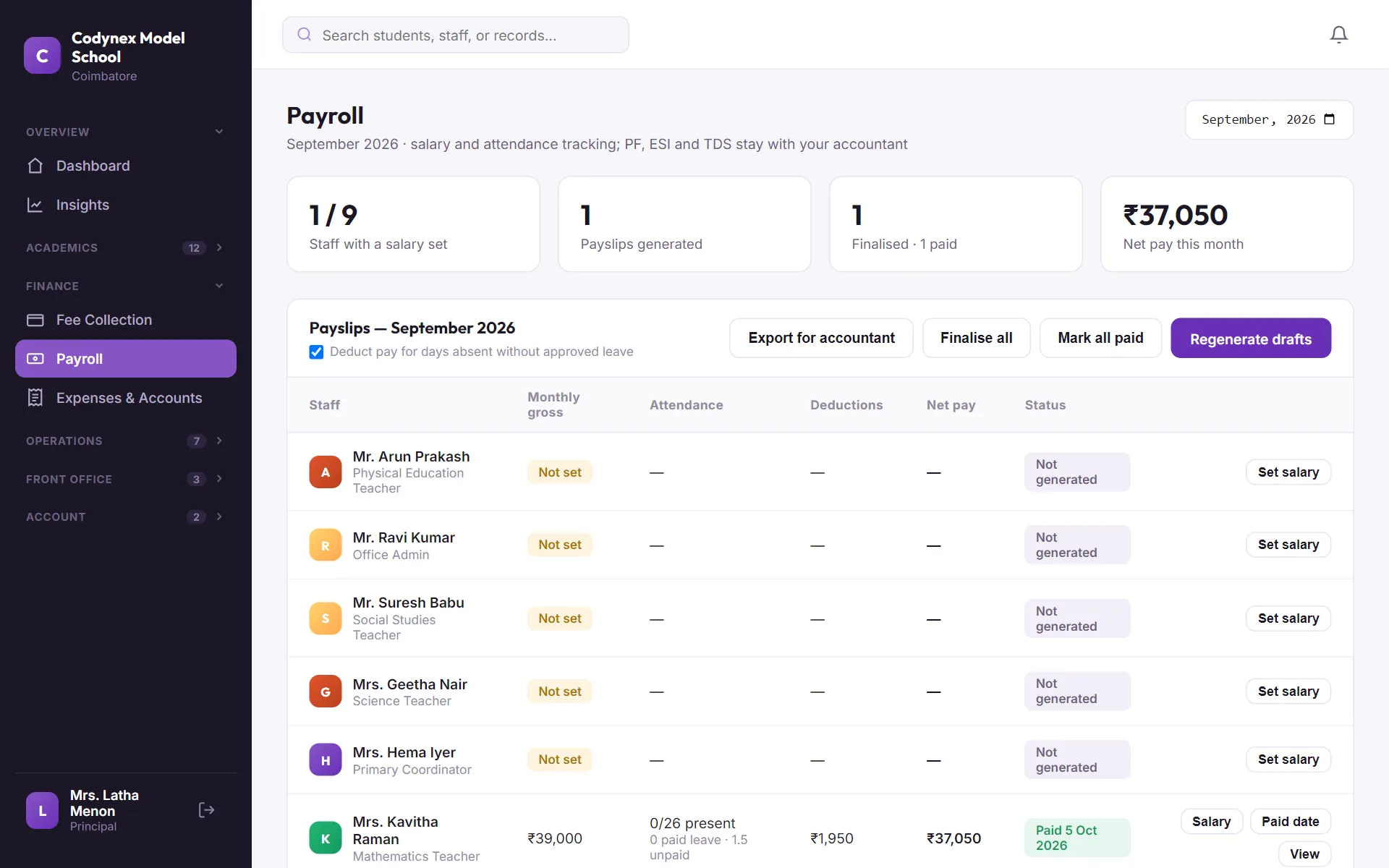
Staff check in, leave is approved in the app, and the month's payslip is worked out from it.
ReplacesCounting leave days by hand
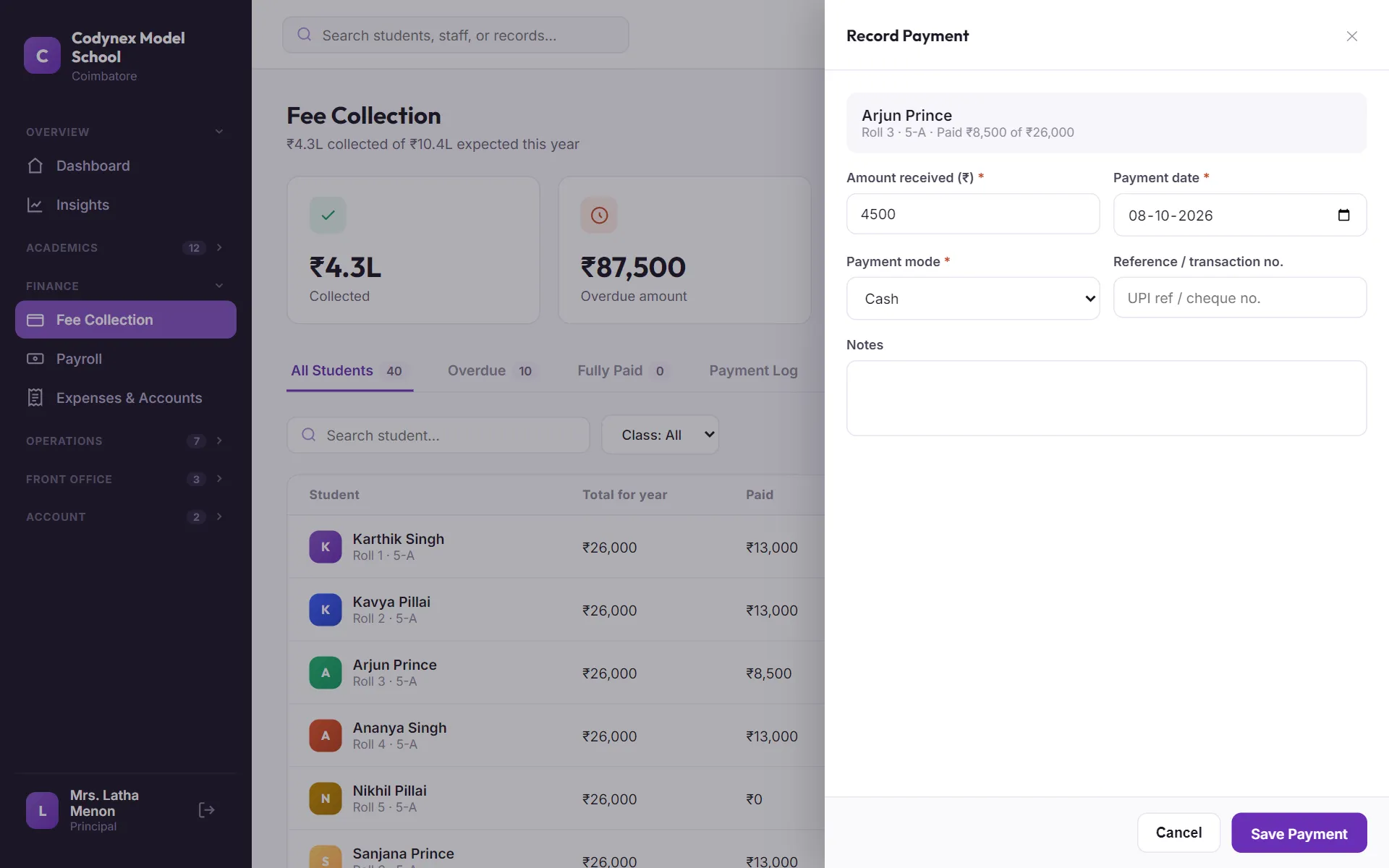
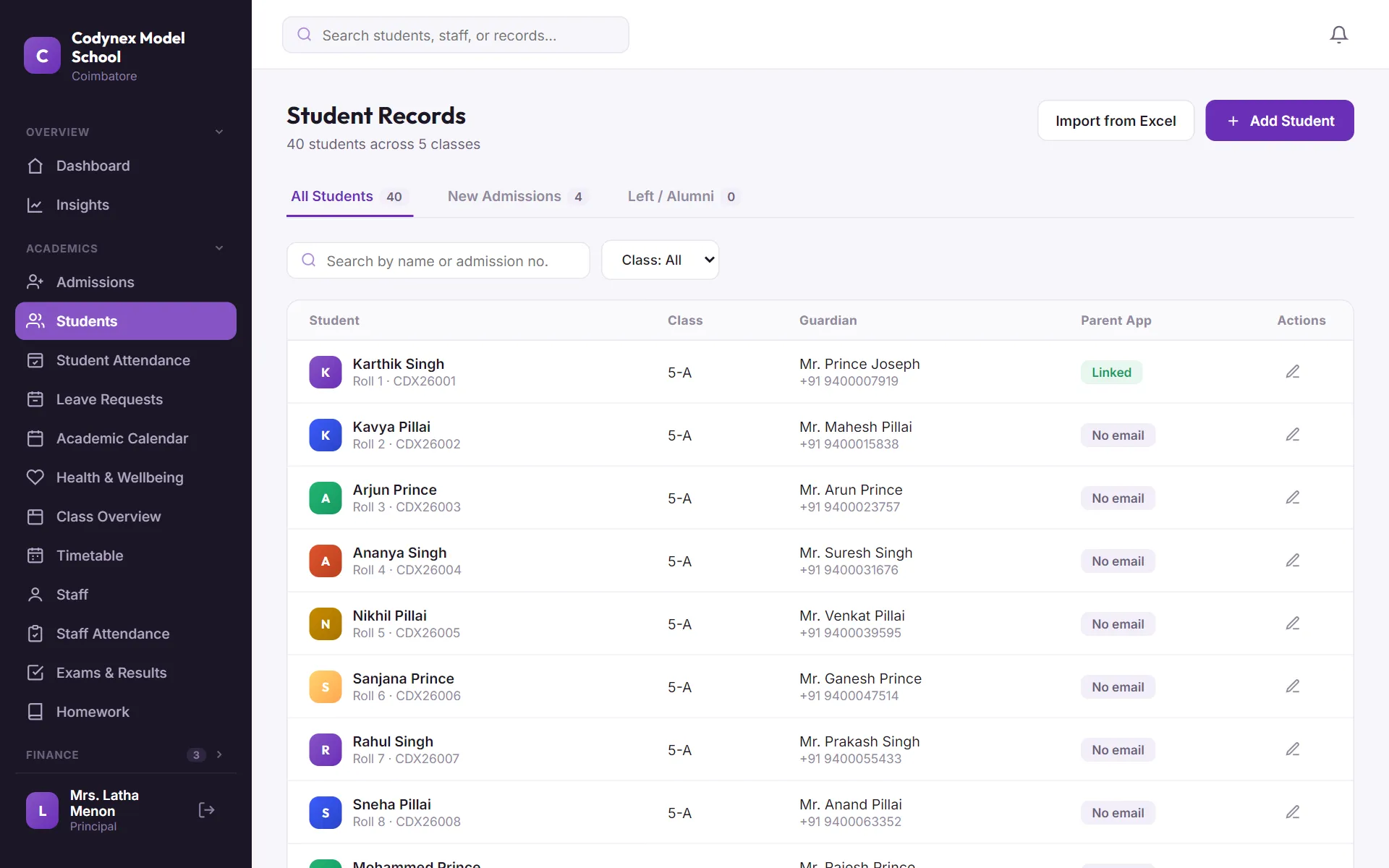
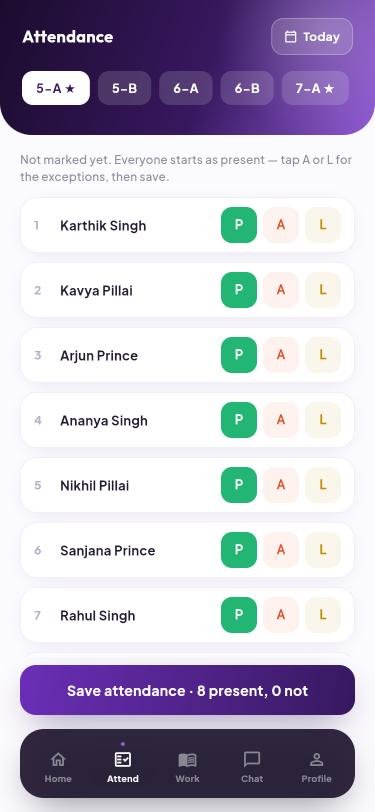
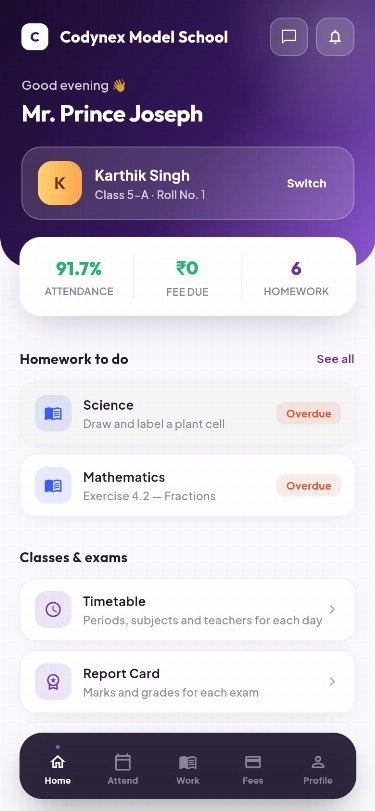
Real screens from our demo school. Names and figures are sample data.
Sound familiar?
Registers, notebooks, spreadsheets and group chats each work on their own. Together, nobody has the full picture, and the office spends its day answering questions.
One set of records, entered once.
The office, the teachers and the parents all look at the same information, each from their own side.
- Attendance marked in every class, visible the same morning
- Fees received and overdue, to the rupee
- Notices sent to the right classes, and acknowledged
- Marks entered once, report cards ready as PDFs
- Every bus, stop and rider on record
02For teachers
The register, the diary and the notice board, in their pocket.
-
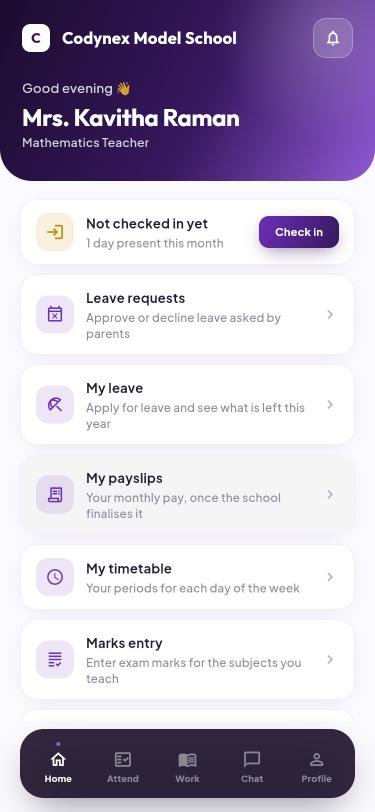
Check in, see today's periods, approve a leave request, enter marks, read the staff notice. No training needed.
ReplacesRegisters, slips and the notice board
-
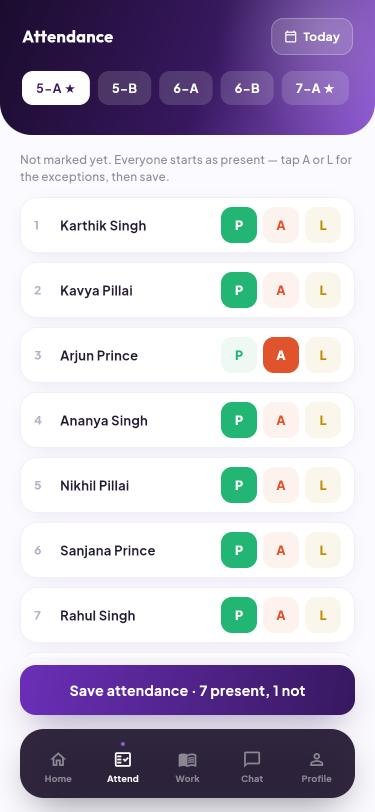
Everyone starts as present. The teacher taps only the exceptions and saves, in under a minute.
ReplacesCalling out forty names
-
The count updates as the teacher taps. Once saved, the office sees the class and parents see their child's day.
ReplacesParents phoning the office to check
-
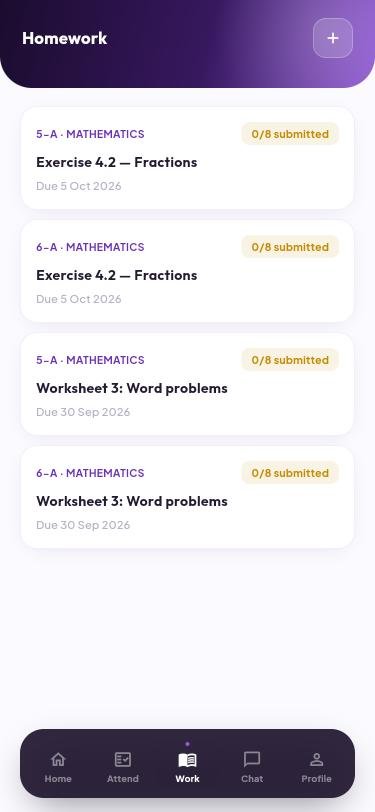
Set homework for a class in a few taps. Parents upload a photo of the finished work, and the teacher sees who is still pending.
ReplacesA diary note that never reached home
03For parents
What happened at school today, without calling the office.
-
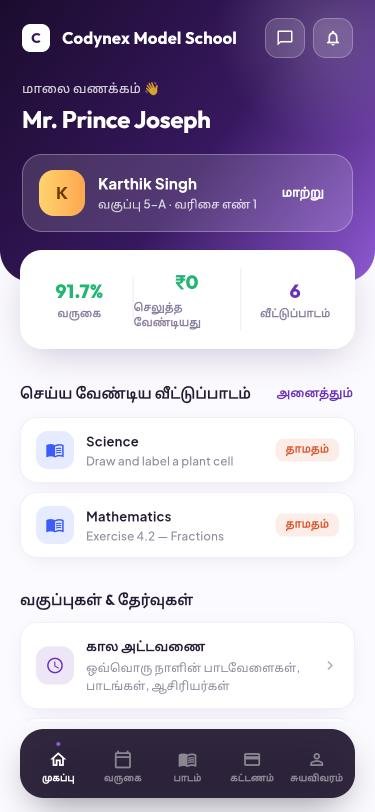
Attendance, fees due and homework on the first screen. Parents with two children at the school switch between them in one tap.
Replaces"What happened at school today?"
-
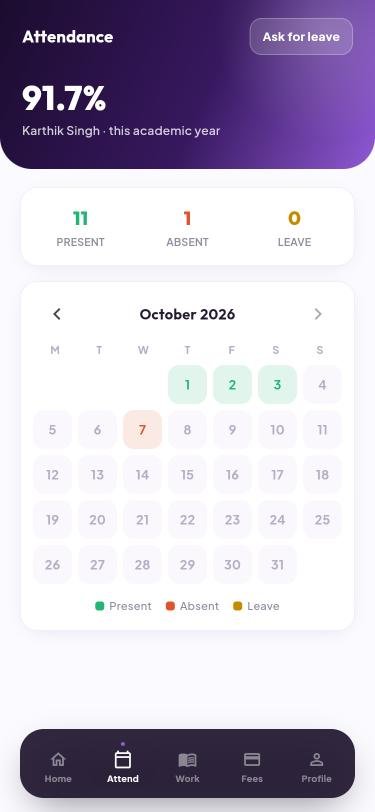
Present, absent and leave for the whole year on a calendar. A parent can ask for leave from the same screen.
ReplacesFinding out at the parent-teacher meeting
-
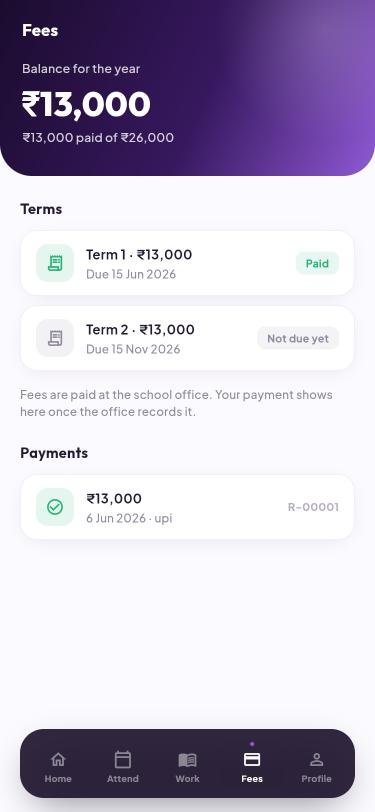
Each term, each payment and its receipt. Fewer calls to the office, fewer misunderstandings at the counter.
Replaces"Did we pay the second term?"
-
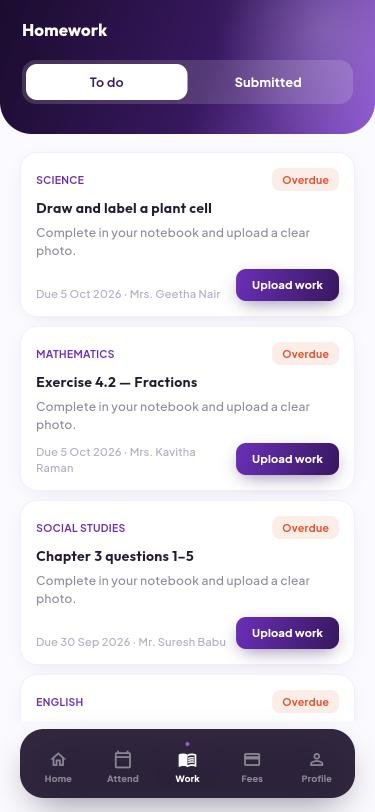
Every subject's homework with its due date. Parents upload a photo of the work, in English or Tamil.
Replaces"I forgot my notebook"
தமிழில் · In Tamil
The parent app speaks Tamil.
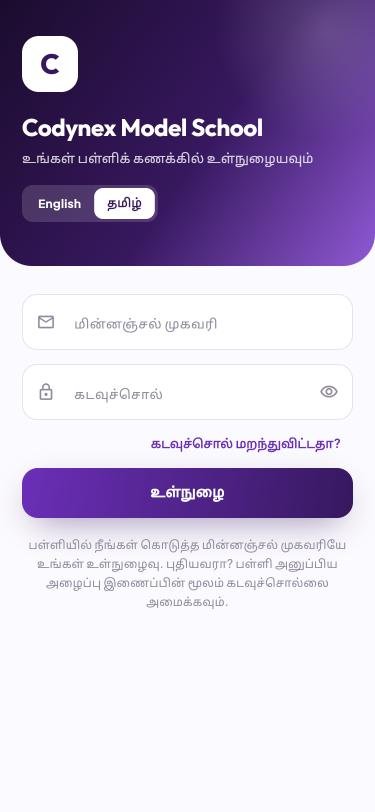
Many parents are more comfortable in Tamil than in English. They choose their language on the sign-in screen and can switch at any time. Menus, buttons, dates and messages from the school's system all follow.
- One tap to switch between English and தமிழ்
- Every screen a parent uses: attendance, fees, homework, notices
- Teachers and the office keep working in English
Your school's name, not ours.
The web panel and the app carry your school's name, logo and colour. To a parent it is simply the school's own app.
Free for parents and teachers.
The school subscribes. Nobody else pays, and there is nothing for parents to buy inside the app.
- Each parent and teacher gets their own sign-in
- Each school gets its own app, for Android and iPhone
- The web panel works in any browser
04Everything else
And the rest of the school day.
Transport
Bus routes, stops and timings, and which student rides which bus.
Notices and messages
Send to the school, a class or the staff, and see who acknowledged it.
Report cards as PDFs
Report cards, fee receipts and payslips to keep or print.
Certificates
Parents ask for a bonafide or fee letter from the app; the office issues it.
Library
The book list, who has which copy, and what is overdue.
Front office
A visitor log and gate passes for children who leave early.
Year end
Promote classes, carry fee arrears forward and issue transfer certificates.
Roles for the office
The accountant, librarian and front desk each see only their own part.
05Getting started
From first look to first day.
See it working
We walk you through the office panel, the teacher app and the parent app with a sample school, and answer your questions.
We set up your school
Your classes, staff and fee plans go in. The student list can be uploaded from a spreadsheet, checked for mistakes first.
Everyone signs in
Teachers and parents get their own sign-in, and the school starts using it class by class or all at once.
06Who we are
A small team you can reach.
Built in Coimbatore, by people you can call.
Codynex School is made by Codynex Technology, a founder-led software studio in Coimbatore. We have spent four years building websites, online stores and apps for businesses across Tamil Nadu.
"You talk to the person who built it. No call centre, no hand-offs."Joy Prince, founder and lead developerCodynex Technology
MGR Street, Thondamuthur Road, Coimbatore, Tamil Nadu 641041
+91 93450 21613 · support@codynextech.com · codynextech.com
New, and that is the offer.
Codynex School is our own product and it is new. The schools that join now work directly with the founder, get help setting up, and have a say in what we build next.
- 20+
- websites and apps delivered for other businesses
- 4+
- years building software
- 5.0
- average across 11 client reviews of our studio work
07Questions
What schools ask us first.
Do parents pay anything for the app?
No. The school subscribes; parents and teachers use the app free of charge.
What does it cost?
It depends on how many students the school has. We share the exact figure for your school at the demo.
Which phones does the app work on?
Android and iPhone. Each school gets its own app, published under the school's name, and we set that up as part of getting you started. The web panel works in any browser on a computer, tablet or phone.
Can we bring in our existing student list?
Yes. Students can be uploaded from a spreadsheet, and the upload is checked for mistakes before anything is saved.
Can other schools see our data?
No. Every record belongs to one school, and a school's staff and parents can only reach their own school's records.
Do parents who read Tamil need English?
No. A parent chooses English or Tamil in the app and can switch at any time.
See it running for a school like yours.
Tell us about your school and we will call you to arrange a demo at a time that suits you.
- A walk-through of the office panel, the teacher app and the parent app
- The price for a school of your size
- No obligation to sign up
Prefer to talk now? Call +91 93450 21613 or message us on WhatsApp.
Thank you
We have your request and will call you to arrange the demo.
08Help us improve
What should this do for your school?
Tell us what is missing, what is confusing, or what your school does differently. Every message is read by the person building the software, and the best ideas go into it.
- A feature your school needs that you did not see here
- Something that should work differently
- Anything about this page that was unclear
Thank you
We read every suggestion, and yours is with us now.